
Palworld world settings live on the screen you get by picking a world and pressing Change World Settings. You either choose a difficulty or open Custom Settings and set EXP, capture rate, death penalty and the rest one by one. A dedicated server has no such screen: the same values go into PalWorldSettings.ini. Every option name below is taken from the English game data of the Steam build v1.0.5 (build 102999), and the server behaviour was checked on a test server running the same version on November 10, 2026.
How to change world settings
A world on your own PC (invite-code world)
- On the title screen, press Start Game to open the world list (WORLD SELECT) and pick the world.
- Press Change World Settings at the bottom.
- Under Difficulty, pick Casual, Normal, Hard or Hardcore, or switch to Custom.
- With Custom, press Custom Settings, set each option, then press OK.
As the game itself notes, difficulty can still be changed after the world is created. The exceptions are the two Hardcore options and Random Pal Mode, covered under "Options you can't change later" below.
Your choices are saved in the world folder as WorldOption.sav. Opening that file shows 122 values: everything on the world settings screen plus the server name, player limit and admin password. It is the same list of 122 keys as the DefaultPalWorldSettings.ini that ships with the server.
A dedicated server
The server reads Pal/Saved/Config/LinuxServer/PalWorldSettings.ini (WindowsServer on Windows) instead of a settings screen. All keys and values sit on one line, OptionSettings=(...), separated by commas.
- Stop the server first.
- Edit the values in
PalWorldSettings.ini. If the file is empty, start from a copy ofDefaultPalWorldSettings.iniin the server folder. - Start the server. The file is read once, at startup.
Don't edit the file while the server is running. On our test server we changed ExpRate to 2 while it was running, then stopped it, and the server rewrote the file with the value it had at startup (1) on the way down. It did that every time: stopped with Ctrl+C (SIGINT), with kill (SIGTERM), and through the REST API shutdown call. Only when we stopped the server first, edited, and started it again did the REST API report ExpRate 2.
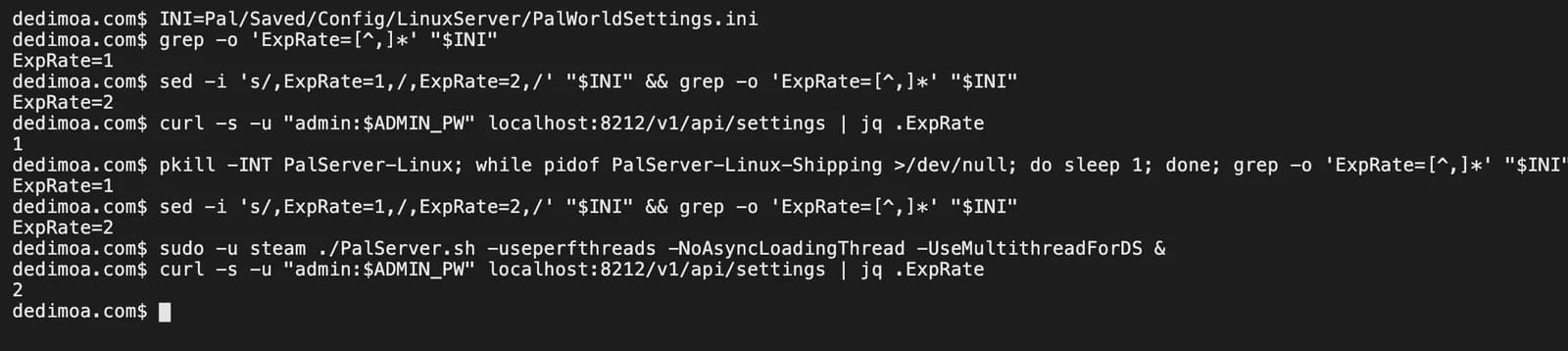
On a DediMoa server, change the values in the console's settings page and save; they apply when the server restarts. To build the ini line yourself, pick values in the Palworld server settings generator and copy the result.
Values behind each difficulty
Picking a difficulty preset changes these values all at once. Any multiplier not listed is 1 on all four.
| In-game name | Casual | Normal | Hard | Hardcore |
|---|---|---|---|---|
| EXP Rate | 1.3 | 1 | 0.8 | 0.8 |
| Pal Capture Rate | 2 | 1 | 0.8 | 0.8 |
| Gatherable Items Multiplier | 2 | 1 | 0.5 | 1 |
| Dropped Items Multiplier | 2 | 1 | 0.5 | 1 |
| Time (h) to incubate Massive Egg | 0 | 1 | 2 | 2 |
| Damage from Player Multiplier | 1.5 | 1 | 0.5 | 0.5 |
| Damage to Player Multiplier | 0.7 | 1 | 1.5 | 2 |
| Death Penalty | No drops | All items except equipment | All items and Pals | All items and Pals |
| Hardcore: permanent player loss | Off | Off | Off | On |
| Hardcore: permanent Pal loss | Off | Off | Off | On |
| Global Palbox save and restore | Allowed | Allowed | Allowed | Blocked |
Hardcore puts gathering and drops back to 1, more generous than Hard. Its point isn't slower progress; it's that falling once is the end. The table shows the in-game presets; the server's default file has Global Palbox restore turned off (see Travel and multiplayer below).
Writing only a difficulty name into the server's Difficulty key did not bring these values along. We started the test server with Difficulty=Easy and then Difficulty=Hard, and the EXP, capture, gathering, hatching and damage values reported by the REST API stayed at 1 every time. On a server, you have to write each value from the table above.
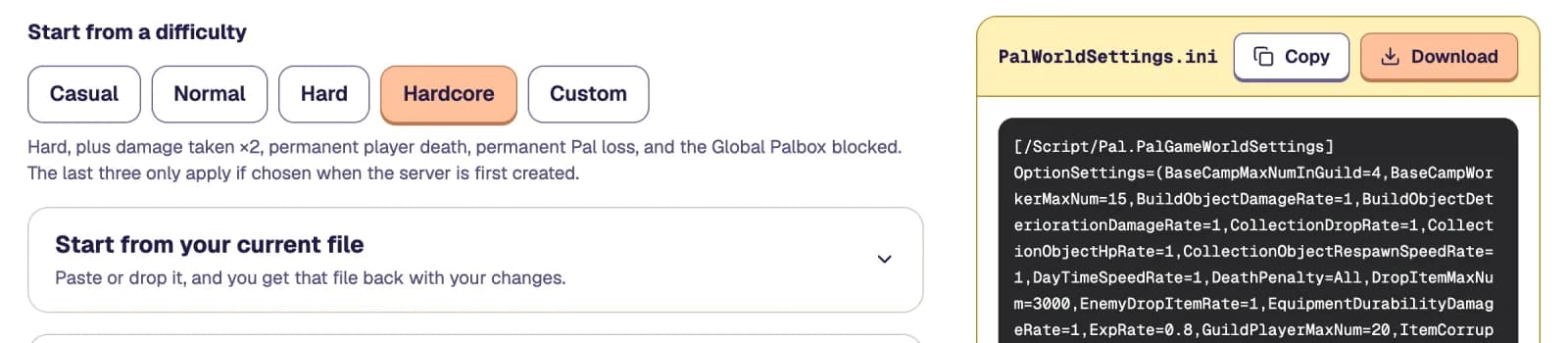
If copying the table by hand sounds tedious, use "Start from a difficulty" in the Palworld server settings generator. The four buttons from Casual to Hardcore fill in the same values as the table at once and leave everything not in the table alone. Click Hardcore and you can watch DeathPenalty turn into All and ExpRate into 0.8 in the ini on the right.
What each option does
Names are as they appear in game; defaults come from DefaultPalWorldSettings.ini on the v1.0.5 server. Multipliers default to 1: 2 doubles, 0.5 halves.
Time and progression
| In-game name | ini key | Default | What changes |
|---|---|---|---|
| Day Time Speed | DayTimeSpeedRate | 1 | Higher makes days pass faster |
| Night Time Speed | NightTimeSpeedRate | 1 | Higher makes nights pass faster. Raise this to shorten nights |
| EXP Rate | ExpRate | 1 | EXP earned by players and Pals |
| Pal Capture Rate | PalCaptureRate | 1 | Chance that a Pal Sphere succeeds |
| Pal Appearance Rate | PalSpawnNumRate | 1 | Number of wild Pals in the field. The game itself warns it affects performance |
| Time (h) to incubate Massive Egg | PalEggDefaultHatchingTime | 1 | In hours. Other eggs scale with it; 0 hatches instantly |
| Work Speed Multiplier | WorkSpeedRate | 1 | How fast base Pals craft and mine |
| Grazing Item Production Rate Multiplier | MonsterFarmActionSpeedRate | 1 | How fast Pals on a ranch produce eggs and materials |
Combat
| In-game name | ini key | Default | What changes |
|---|---|---|---|
| Damage from Pals Multiplier | PalDamageRateAttack | 1 | Applies to wild Pals and yours alike |
| Damage to Pals Multiplier | PalDamageRateDefense | 1 | Same as above |
| Damage from Player Multiplier | PlayerDamageRateAttack | 1 | |
| Damage to Player Multiplier | PlayerDamageRateDefense | 1 | |
| Damage to Structure Multiplier | BuildObjectDamageRate | 1 | Damage dealt to structures |
| Death Penalty | DeathPenalty | Item | What you drop when you fall. See below |
| Enable Raid Events | bEnableInvaderEnemy | True | Base raids |
| Enable Predator Pals | EnablePredatorBossPal | True |
Death Penalty takes four values.
| In game | ini value |
|---|---|
| No drops | None |
| Drop all items except equipment | Item |
| Drop all items | ItemAndEquipment |
| Drop all items and all Pals on team | All |
Survival and recovery
| In-game name | ini key | Default |
|---|---|---|
| Player Hunger Depletion Rate | PlayerStomachDecreaceRate | 1 |
| Player Stamina Reduction Rate | PlayerStaminaDecreaceRate | 1 |
| Player Auto Health Regeneration Rate | PlayerAutoHPRegeneRate | 1 |
| Player Sleep Health Regeneration Rate | PlayerAutoHpRegeneRateInSleep | 1 |
| Pal Hunger Depletion Rate | PalStomachDecreaceRate | 1 |
| Pal Stamina Reduction Rate | PalStaminaDecreaceRate | 1 |
| Pal Auto Health Regeneration Rate | PalAutoHPRegeneRate | 1 |
| Pal Sleep Health Regeneration Rate (Health Regeneration Rate in Palbox) | PalAutoHpRegeneRateInSleep | 1 |
Lower depletion rates mean slower hunger and stamina loss. Decreace in the key names is the game's own spelling, so don't correct it.
Gathering and items
| In-game name | ini key | Default | What changes |
|---|---|---|---|
| Gatherable Items Multiplier | CollectionDropRate | 1 | How much wood, stone and ore you get |
| Gatherable Objects Health Multiplier | CollectionObjectHpRate | 1 | Lower breaks them faster |
| Gatherable Objects Respawn Interval | CollectionObjectRespawnSpeedRate | 1 | It's an interval, so lower respawns faster |
| Dropped Items Multiplier | EnemyDropItemRate | 1 | Loot from defeated Pals |
| Item Weight Rate | ItemWeightRate | 1 | Lower lets you carry more |
| Item Decay Rate Multiplier | ItemCorruptionMultiplier | 1 | How fast food spoils |
| Equipment Durability Loss Multiplier | EquipmentDurabilityDamageRate | 1 | |
| Meteorite/Supplies Drop Interval | SupplyDropSpan | 180 | In minutes |
| Maximum Number of Dropped Items in a World | DropItemMaxNum | 3000 | Cap on items lying on the ground |
| Enable Character Defecation | bActiveUNKO | False | |
| Maximum amount of defecation in a world | DropItemMaxNum_UNKO | 100 |
Bases and guilds
| In-game name | ini key | Default | What changes |
|---|---|---|---|
| Structure Deterioration Rate | BuildObjectDeteriorationDamageRate | 1 | How fast structures wear down over time |
| Maximum number of bases for each guild | BaseCampMaxNumInGuild | 4 | |
| Maximum number of work Pals at the base | BaseCampWorkerMaxNum | 15 | Working Pals per base |
| Maximum number of structures per base | MaxBuildingLimitNum | 0 | 0 means no limit |
| Maximum Number of Guild Members | GuildPlayerMaxNum | 20 | |
| Automatically Delete Offline Guilds After Set Time | bAutoResetGuildNoOnlinePlayers | False | When on, structures of long-inactive guilds are removed |
| Time (h) Until Offline Guilds Are Automatically Deleted | AutoResetGuildTimeNoOnlinePlayers | 72 | Only used when the option above is on |
Travel and multiplayer
| In-game name | ini key | Default |
|---|---|---|
| Enable Fast Travel | bEnableFastTravel | True |
| Restrict Fast Travel to bases only | bEnableFastTravelOnlyBaseCamp | False |
| Allow Pal Genetic Data to be saved in the Global Palbox | bAllowGlobalPalboxExport | True |
| Allow Pals to be reconstructed from the Global Palbox | bAllowGlobalPalboxImport | False |
| Platforms Allowed for Cross-Play | CrossplayPlatforms | (Steam,Xbox,PS5,Mac) |
| Auto save interval | AutoSaveSpan | 30 (seconds) |
| Fish Behavior During Fishing Minigames | FishingDifficultyRate | 1 |
bAllowGlobalPalboxImport is False in the server's default file. To restore Pals from the Global Palbox on a server the way you could on your own PC, set it to True.
Options you can't change later
| In-game name | ini key | Default | What the game says |
|---|---|---|---|
| Hardcore Mode: Permanent loss of progress upon player death | bHardcore | False | Cannot be turned on after starting |
| Hardcore Mode: Pals who die will be permanently lost | bPalLost | False | Cannot be turned on after starting |
| Random Pal Mode | RandomizerType | None | Cannot be changed after creating the world. Values: None, Region (Randomize by Region), All (Completely Random) |
| Seed | RandomizerSeed | empty | Seed for Random Pal Mode |
If you want Hardcore, turn it on when you create the world. On a server, put it in the ini before the very first start, before the world is generated.
Two reasons a server ignores your world settings
You edited the ini while the server was running
As shown above, the server rewrites the ini with its startup values when it shuts down. Stop, edit, start, in that order.
There's a WorldOption.sav in the world folder
Copying a whole world folder from your PC to a server brings WorldOption.sav along. When that file is present, the server uses its 122 values instead of the ini.
On our test server, dropping in a co-op world's WorldOption.sav as-is made the REST API refuse with Unauthorized (AdminPassword is empty), even though the ini had an admin password. A file created by a co-op world has an empty admin password. With a WorldOption.sav where we had only set ExpRate to 3, the server used 3 while the ini said ExpRate=1, and the server name and player limit switched to the file's values too. Deleting the file and restarting brought the ini values back.
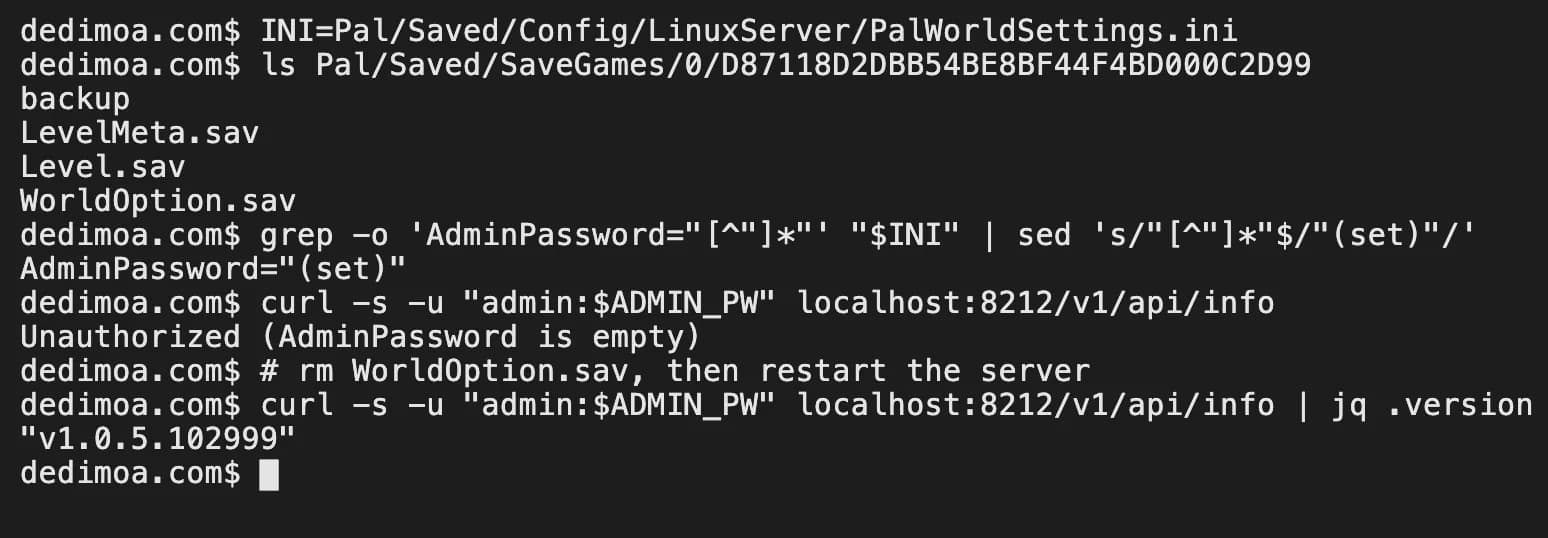
To keep your world settings on a server, leave WorldOption.sav out and copy the same values into the ini using the tables above. The save converter used in Palworld server transfer leaves this file out of its ZIP.
Servers set up early have different defaults
If you set up your server early in Early Access, its ini may hold defaults that differ from today's. Copies of the server's default file published in January 2024 list Death Penalty as All (Drop all items and all Pals on team) and Massive Egg hatching as 72 hours. The v1.0.5 server's DefaultPalWorldSettings.ini has Item and 1 hour respectively.
Updating the server doesn't put the new defaults into the ini. The server reads whatever is written in PalWorldSettings.ini and writes the same values back when it shuts down. If a server built from that old default file makes you lose your Pals when you fall, or eggs take three days to hatch, check DeathPenalty and PalEggDefaultHatchingTime first.
Drop your current PalWorldSettings.ini into "Start from your current file" in the settings generator and it shows both values next to their option names. Change just those two and download: everything else, including keys the generator doesn't handle, comes back exactly as it was in your file.
FAQ
What does "Disabled due to World Settings" mean?
It's the label on technologies that world settings have locked. In the game data that text belongs to the technology lock. There's no option on the world settings screen that blocks technologies, so on a server, first check whether that technology is listed in the ini's DenyTechnologyList. When fast travel is turned off you get a different message: "Fast Travel cannot be used via world settings."
Can I turn on Hardcore Mode later?
No. The game says it cannot be turned on after starting. For Hardcore, turn it on when you create a new world.
If I only set Difficulty to Hard on a server, does it get harder?
Not on our test server. The individual multipliers it reported were all still 1. Use the difficulty table to set each value, or fill them in at once with "Start from a difficulty" in the settings generator.
Do changed settings apply to a world I've already made?
Yes, except the two Hardcore options and Random Pal Mode. Multipliers and the death penalty take effect the next time the world loads (for a server, the next start).